Overview
This project uses the Coral Dev Board Micro to detect my cat meowing and then plays a voice recording to calm my cat. In my first blog post (Meow Detector – Part 1: Detection), I just set the green User LED to light up whenever a meow was detected. This post details the steps to play back audio after detecting my cat meowing.
Demonstration Video
Materials

The links below are similar to the materials I used in the project. I picked up a speaker for $1 and voice playback module for $12 at Torrance Electronics Inc.
- Coral Dev Board Micro – $80
- Voice Playback Module – $12
- SD Card – $11
- Speaker – $6
- Solderable Breadboard
- Header pins
- USB-C Breakout Board
Wiring


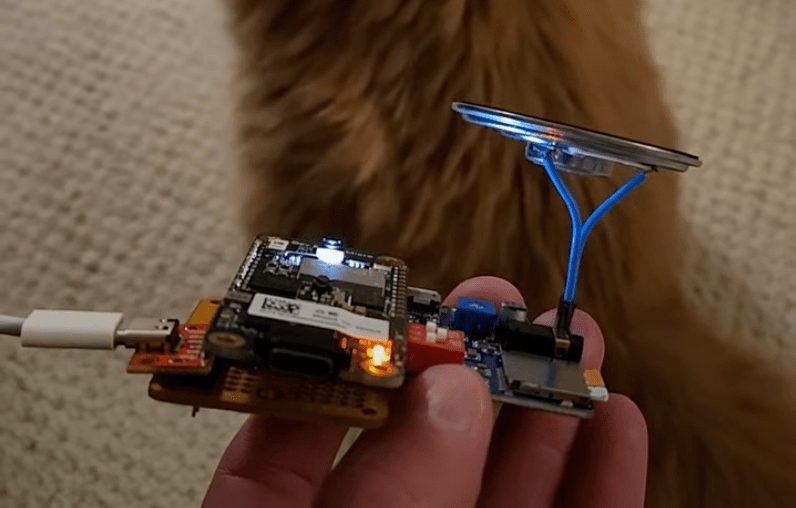
- The USB-C Breakout VBus pin provides 5V to power the Coral Dev Board and the Audio playback module. It connects to the VSYS pin of the Coral Dev Board micro and the +5V pin of the Audio Playback module (red wire in picture).
- The USB-C Breakout GND pin connects to Coral Dev Board micro ground and Audio Playback module ground pins (black wire in picture).
- The Speaker can connect in any orientation to the “Speaker” pins on the Audio playback module. It also has a 3.5mm headphone jack as another option.
- The Coral Dev connects 4 GPIO pins to IO0 through IO3 pins on the Audio playback module. This is shown in the table below. The corresponding MP3 is played when the IO pin is grounded.
| Coral Dev Board Micro Pin | Audio Playback Module Pin | MP3 Name (On SD Card) |
| A1 | IO0 | 00001.mp3 |
| A0 | IO1 | 00002.mp3 |
| D2 | IO2 | 00003.mp3 |
| D1 | IO3 | 00004.mp3 |
Code
The code can be found here and is compatible with the Arduino IDE.
The Coral Dev Board Micro gives the options to program using FreeRTOS or Arduino IDE. I used the Arduino IDE since I was more familiar.
I based the code on the ClassifyAudio example and my previous post here. Also see my previous post for notes on flashing the Coral Dev Board Micro.


 Projects for my cat and More
Leave a reply to Dan Cancel reply