
Overview
The goal of this project is to use the Coral Dev Board Micro to detect my cat meowing and then play a voice recording to calm my cat. In this first blog post I just set the green User LED to light up whenever a meow is detected.
This project uses the board’s built in speaker and runs a TensorFlow Lite model on the Edge TPU.

Demonstration Video
Materials
- Coral Dev Board Micro – $80

Code
The code can be found in my Github here. It turns on the green LED when it detects a Meow.
The Coral Dev Board Micro gives the options to program using FreeRTOS or Arduino IDE. I used the Arduino IDE since I was more familiar.
I based the code on the ClassifyAudio example. It uses the YAMNet audio event classifier and runs on the Coral Edge TPU. The label indices can be seen here (Meow is 78). Since the YAMNet model can detect 521 different audio events the code can easily be modified to detect any of them.
Flashing notes
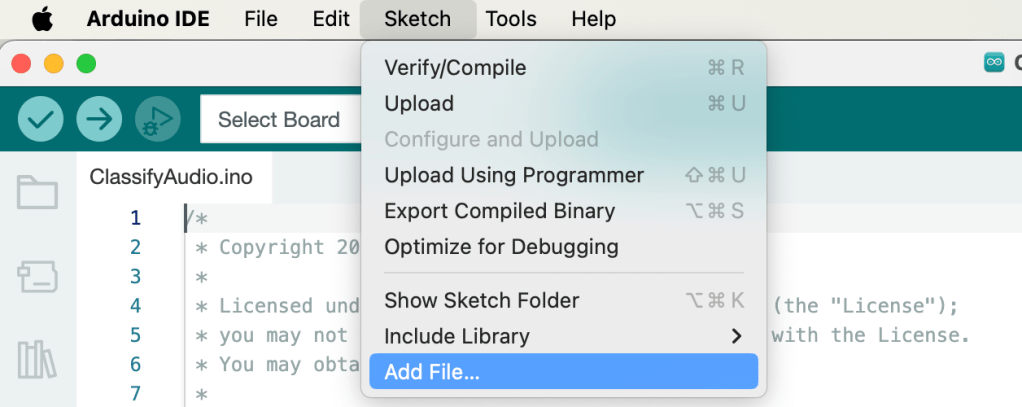
It was necessary to add the Tensor Flow Lite file yamnet_spectra_in_edgetpu.tflite to the Arduino sketch to flash to the Edge TPU. This can be done by selecting it in Sketch -> Add File… as shown below. Note this caused the path to change in the default example from “/models/yamnet_spectra_in_edgetpu.tflite” to just “/yamnet_spectra_in_edgetpu.tflite”.
Another note is that in order for the board to be discoverable for flash, it was necessary to put the board in SDP mode. The documentation says to “Hold the User button while you plug in the USB cable” or “Hold the User button while you press the Reset button”.
Next steps
In my next blog post I will set up the rest of the components to automatically play voice recordings to respond to when my cat meows.

 Projects for my cat and More
Leave a comment